Glossary · Formats
Explore →What Is Print-on-Demand? Book Publishing Guide | ArteBook
What Print-on-Demand means in book publishing and KDP: key formatting specs, pitfalls, and how ArteBook Studio automates it.
Clear publishing definition, technical specifications, real-world examples, and automated workflow guide for Table of Contents (TOC).
| Specification Dimension | Table of Contents Standard | ArteBook Studio Implementation |
|---|---|---|
| Publishing Domain | Formats, Packaging & KDP Essentials | Built natively into the collaborative book editor & export suite. |
| Technical Benchmark | EPUB 3.0 / PDF-X / ISO ISBN & KDP Storefront Compliance | Validated automatically prior to KDP, Apple Books, or journal upload. |
| Primary Failure Mode | Risk of exporting non-standard files from generic word processors that fail Kindle or IngramSpark preflight checks | Eliminated via semantic chapter templates and live pre-publish checks. |
| Supported Export Targets | Print PDF (6×9, 5.5×8.5, A5, A4), EPUB 3.0, DOCX, JATS XML | Generated from one single-source manuscript in one click. |
| Plan Availability | Included from $0 Starter Studio & $14.99/mo Creator | 100% commercial rights + upfront credit estimates on AI actions. |
In professional book production, table of contents directly shapes both storefront approval and reader trust. Because Table of Contents (TOC) is a structured navigational map at the front of a publication listing parts, chapters, and key subsections—with clickable hyperlinks in EPUB 3.0 and accurate page numbers in Print PDF, getting it right separates bookstore-caliber trade paperbacks, Kindle editions, and cited monographs from amateur document uploads.
First-time authors and busy marketing or academic teams most frequently run into trouble by exporting non-standard files from generic word processors that fail Kindle or IngramSpark preflight checks. Addressing table of contents systematically inside your manuscript architecture protects your reviews, improves Look Inside sample conversion, and saves hours of last-minute reformatting.
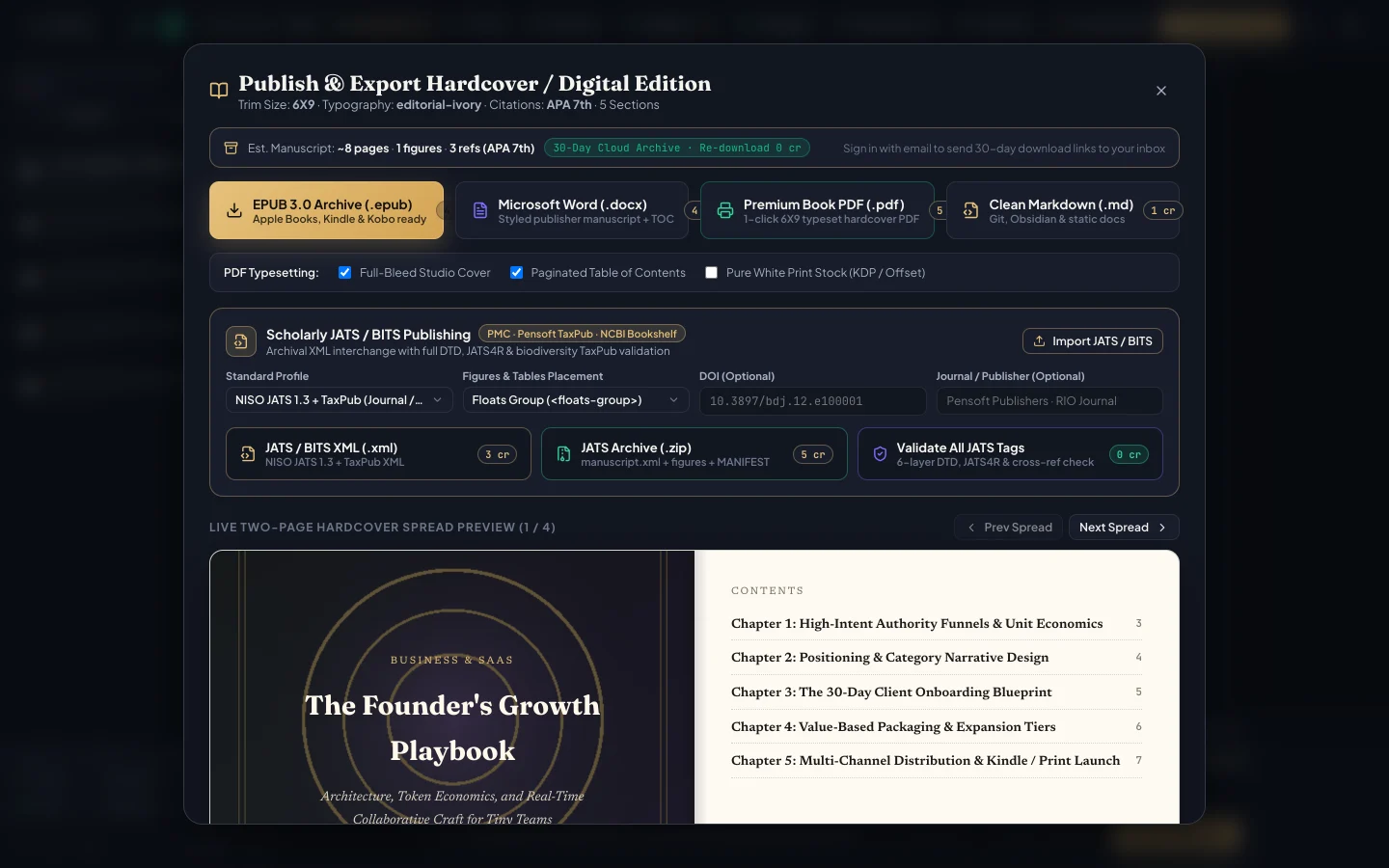
Whether you are producing a 35-page B2B lead magnet, an interactive A4 client workbook, a 180-page 6×9 Amazon KDP trade paperback, or a peer-reviewed scientific manuscript, align table of contents with EPUB 3.0 / PDF-X / ISO ISBN & KDP Storefront Compliance. Pair clear H1–H3 chapter hierarchy with scannable comparison tables, callouts, numbered figures, mathematical equations, or verified DOI citations (APA, MLA, Chicago, Harvard, IEEE, Vancouver) wherever readers need concrete evidence.
During developmental and copyediting passes, invite your co-author, ghostwriter, or editor to inspect table of contents in real time using Track Changes, inline comments, book-wide Find & Replace, and warm Editorial Ivory paper reading mode—catching visual or structural inconsistencies long before launch day.
ArteBook Studio eliminates manual layout guesswork because the platform generates validated Reflowable EPUB 3.0, fixed-trim Print PDF (6×9, 5.5×8.5, A5, A4), Word DOCX, and JATS XML in one click. From your Author Dashboard, you can start from an Idea-to-Book blueprint, import an existing Microsoft Word (.docx) or XML manuscript, dictate chapters by voice across 59 languages, or attach research PDFs and notes with upfront AI credit estimates displayed before every click.
When your team signs off, export Print-Ready PDF (6×9, 5.5×8.5, A5, or A4 with mirrored margins, running headers, linked table of contents, and bleed), Reflowable EPUB 3.0, editable Word (.docx), and Validated JATS XML—complete with 30-day cloud download links emailed automatically and 100% royalty retention ($0 Starter Studio; $14.99/mo Creator with 600 credits).
Table of Contents (TOC) is a structured navigational map at the front of a publication listing parts, chapters, and key subsections—with clickable hyperlinks in EPUB 3.0 and accurate page numbers in Print PDF.
The biggest pitfall is exporting non-standard files from generic word processors that fail Kindle or IngramSpark preflight checks. Using a dedicated book studio prevents manual conversion defects across print and digital editions.
Yes. ArteBook Studio generates validated Reflowable EPUB 3.0, fixed-trim Print PDF (6×9, 5.5×8.5, A5, A4), Word DOCX, and JATS XML in one click—starting at $0 on Starter Studio and $14.99/mo on Creator (600 credits) with 100% author royalties.
What Print-on-Demand means in book publishing and KDP: key formatting specs, pitfalls, and how ArteBook Studio automates it.
What Commercial Publishing Rights means in book publishing and KDP: key formatting specs, pitfalls, and how ArteBook Studio automates it.
What EPUB 3.0 Standard means in book publishing and KDP: key formatting specs, pitfalls, and how ArteBook Studio automates it.
What JATS XML means in book publishing and KDP: key formatting specs, pitfalls, and how ArteBook Studio automates it.
What 6×9 Inch Trim Size means in book publishing and KDP: key formatting specs, pitfalls, and how ArteBook Studio automates it.
What Block Quotation Styling means in book publishing and KDP: key formatting specs, pitfalls, and how ArteBook Studio automates it.
Plan balanced chapter word counts, subsections, tables, and pacing proportions for lead magnets, nonfiction guides, workbooks, and novels.
Build a AI Productivity industry report (35–70 pages) in ArteBook Studio with live co-authoring, voice dictation, and KDP/EPUB exports.